See the exact change first
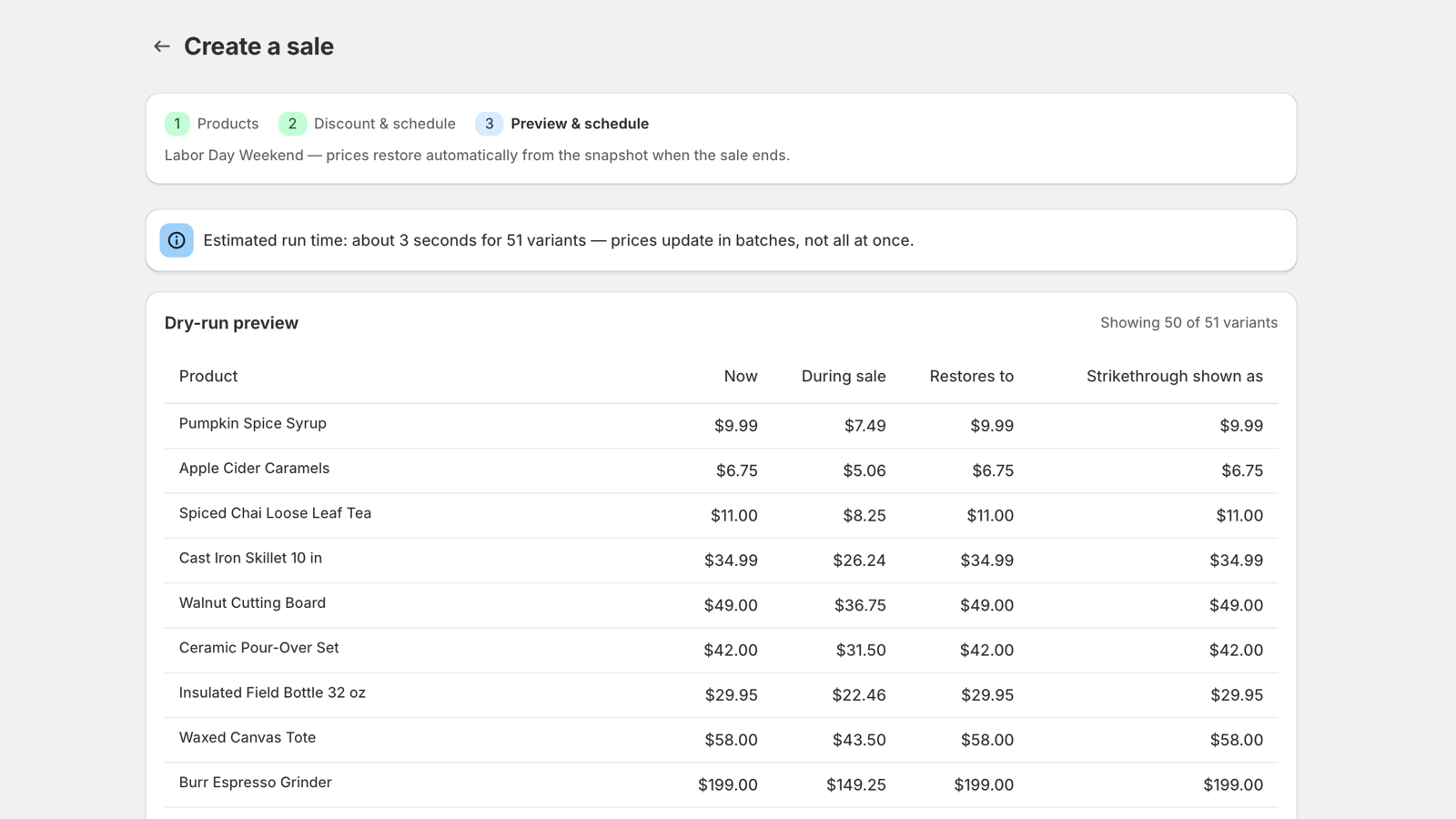
Review current price, sale price, restore value, compare-at behavior, and estimated run time before scheduling.
Most discount apps are built to start a sale. SaleGuard is built to end one. Every original price is captured in a snapshot before the first write, and restoring is never metered — even if your plan runs out mid-promotion.
Before
$49.00
09:00
During
$49.00
$34.30
12:00
After
$49.00
23:59
01 / WHY SALEGUARD
Starting a discount is the easy part. The real operational risk appears at the end: incomplete batches, forgotten variants, or no trustworthy record of the original values.
Original prices become a spreadsheet guess.
Variant-level snapshots
A large sale finishes in uneven batches.
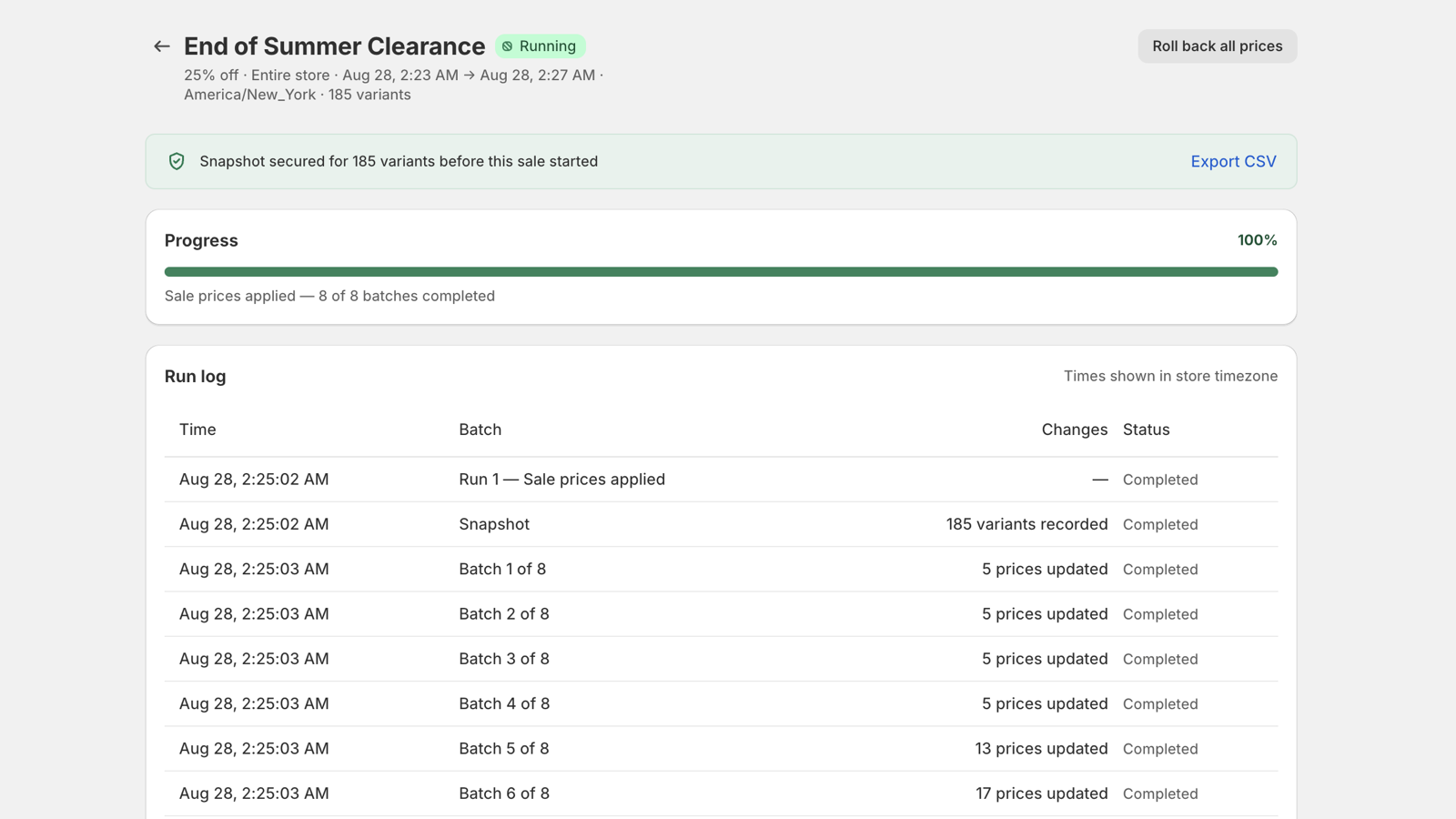
Progress, retries, and run logs
The campaign changes after prices are live.
One rollback action
Quota disappears before the restore run.
Restore is never metered
03 / CONTROL SURFACE
Every plan includes the recovery path. Paid plans increase volume and operating convenience rather than putting restore behind a paywall.
Review current price, sale price, restore value, compare-at behavior, and estimated run time before scheduling.
Price and compare-at price are saved per variant before SaleGuard starts editing your catalog.
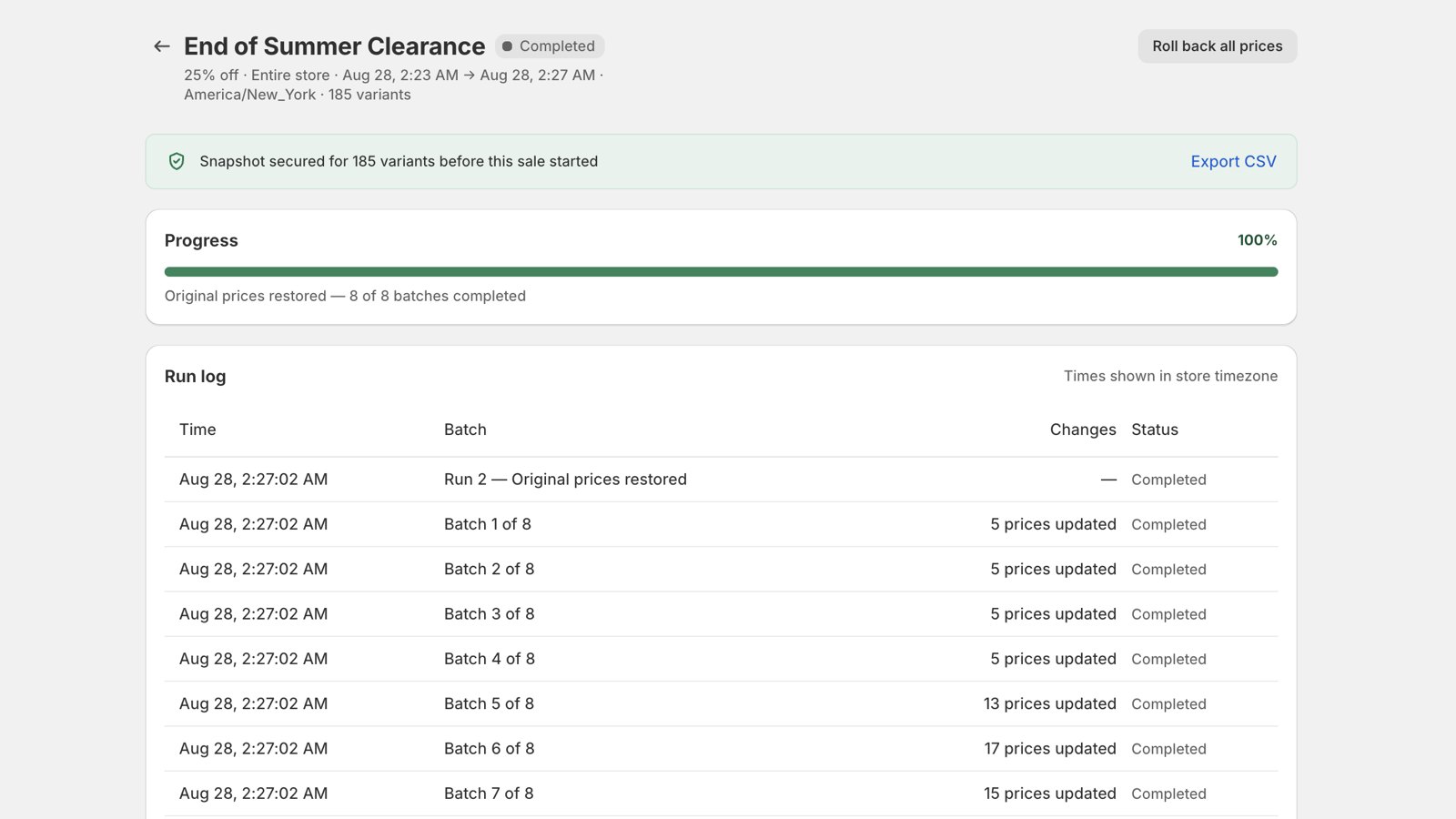
The restore run reads the saved snapshot instead of trying to reconstruct what the old price might have been.
Use one rollback action to return a running promotion to the values captured before it started.
Export the snapshot as a CSV so the original values remain visible and portable outside the app.
SaleGuard edits prices through Shopify APIs and does not inject scripts or liquid into your storefront theme.
Run the same sale daily, weekly or monthly. Each occurrence takes a fresh snapshot before it edits, so every repeat has its own restore path.
Exclude products by tag, round sale prices to end in .99, .95 or .00, and tag every discounted product so you can group and find them anywhere Shopify uses tags.
BEFORE / AFTER
Real screens from the app, no mock-ups. The full three-minute walkthrough is linked below.
Export a spreadsheet, edit prices by hand, hope the file survives.
Pick the scope, preview every variant, schedule the start.
No record of which products changed, or how far the job got.
Batch progress, retries and a run log on one timeline.
Someone has to remember, at the right hour, and not miss a variant.
Prices return from the saved snapshot at the end time.
Re-import a file and hope it was the right version.
One rollback, using the values captured before the sale.
SEE IT RUN
Real screens from the app, no mock-ups. The full three-minute walkthrough is linked below.
Recorded in a live development store. Watch the full 3-minute walkthrough
HOW IT COMPARES
Only real differences are listed. Where another approach is genuinely fine, it says so.
| Against the two ways stores do this today. | Spreadsheet + manual edits | Speed-first bulk editor | SaleGuard |
|---|---|---|---|
| Original prices saved before editing | Only if you remember to export | Depends on the tool | Snapshot per variant, always |
| See the exact result before it runs | No | Sometimes | Dry run, variant by variant |
| Prices return on their own | No | Depends on the tool | Automatic at the end time |
| Stop early without guessing | Re-import a file | Varies | One rollback action |
| You keep your own copy | Yes, that is the whole method | Depends on the tool | Downloadable CSV snapshot |
| Does recovery cost extra | No, but it is your own time | Often a paid-tier feature | Never — restore and rollback on every plan, free included |
| Good enough for a one-off sale | Yes, honestly | Yes | Also fine, but built for repeat sales |
| Repeat a sale on a schedule | Rebuild it by hand each time | Often a top-tier feature | Daily, weekly or monthly — every plan |
| Hold back some products | Split the scope by hand | Varies | Exclude by tag, in one field |
04 / PRICING
$0
No card required
$9.99/ month
7-day free trial
$19.99/ month
7-day free trial
$39.99/ month
7-day free trial
Paid plans include a 7-day free trial.Billing is approved and handled by Shopify.
FOUNDER'S PROMISE
SaleGuard is live on the Shopify App Store. No merchant has left a review yet, and none will be invented. What is on offer is this: restore and rollback stay available on every plan including the free one, your price snapshot is always downloadable, and no code is ever added to your storefront theme. If any of that stops being true, it will be said plainly on this page.
NGUYEN THI THU TRANG
Founder, SaleGuard
05 / FAQ
Yes. Quota counts successful sale-price writes when a sale is created. Restore and rollback do not consume that quota and remain available on every plan.
One successful sale-price write to one product variant counts as one change. Restoring that variant later does not count as another monthly change.
No theme code is installed. SaleGuard changes catalog prices through Shopify APIs, so there is no storefront script, app block, or theme snippet to load.
Yes on Starter and higher plans. You choose the behavior for each sale, and SaleGuard snapshots the previous compare-at value so it can be restored afterward.
They run in controlled batches under Shopify API limits. The dry-run preview estimates the duration before you schedule, and the sale detail page reports progress.
Shopify handles approval and billing for paid plans. Charges appear through your Shopify billing account; SaleGuard does not collect or store your card details.
Billing begins on the plan you approved unless you cancel or move back to Free. Existing snapshots remain available, and restore and rollback are not removed.
OPEN SALEGUARD
Enter your permanent Shopify domain. New stores continue through Shopify authorization; existing stores return to the app.