本文へスキップ

2026年のブラックフライデーは11月27日です。9日 00時間 46分セールを予約する

SaleGuard
Shopifyに追加(無料)無料で導入
Scheduled price changes for Shopify

Shopifyの大型セールを、 価格が戻らない心配なしで。

セール価格が元に戻らなかった、あるいは原価割れで売ってしまった店主のためのアプリです。SaleGuardは最初に元の価格をすべて保存し、原価を下回る価格は止められます。終了時には価格を戻し、一つずつ照合します。

  • Free plan: 300 price changes a month, no time limit. Restores never count.
  • Starter $9.99/mo · Pro $19.99/mo
  • Only 2 permissions, no customer data

Using Shopify Rollouts? See what it covers and what it doesn't

30-second promoPress play. Sound is off until you turn it on.

Hana checking her phone over morning coffee
Restore report on our test store: 22 variants checked
Test store · restore report
Sale ended · sample product
$49.00During the sale $39.20
✓ Original price restored
A concrete example

Changed a price mid-sale? It won't be overwritten.

Before each restore, SaleGuard compares the live price and the compare-at price with what the sale set. If they don't match, it leaves that product alone and lists it in the report. It only overwrites if you press Force restore and confirm.

Canvas tote bag

  1. Before the saleThe original $49.00 is saved.
  2. Sale startsPrice becomes $39.20, with $49.00 struck through.
  3. Day 3You mark it down by hand to $34.00.
  4. Sale endsOther products go back to their originals. This one stays at $34.00 and is listed as “Your own price edits were kept”.

Sample numbers. In a sale on our own test store, the report showed 1 of 22 prices kept because they were edited by hand.

Three steps. Then you can walk away.

Choose the products, set the discount and the start and end time in your store's time zone. Every original price is saved before the first change, and put back at the minute you chose.


Hana at a counter, picking products for a sale on a laptop
  1. 商品を選ぶ. イメージ図

    商品を選ぶ

    コレクション、タグ、ベンダー、在庫、ステータスで絞り込みます。

  2. 割引と時間を決める. イメージ図

    割引と時間を決める

    割引率を選び、ストアのタイムゾーンで開始と終了を設定します。

  3. 価格は自動で元に戻る. イメージ図

    価格は自動で元に戻る

    元の価格をスナップショットから書き戻し、1件ずつ確認します。

After the restore, every price is checked one by one.

Test store walkthrough

One real sale, start to finish

自社のデモストアで20%オフのセールを実施。22バリエーションの結果を、アプリの画面からそのまま写しました。価格は開始時刻に下がり、終了時刻に戻っています。1件はセール中に手で価格を変えていて、SaleGuardはその価格を設定どおり残しました。

  1. Originals saved before the first change22 variants
  2. Discount starts on schedule20% · 8:29:00 PM
  3. Prices restored at the end time8:41:00 PM
  4. Every price checked against its original
    • 22確認したバリエーション
    • 21元の価格と一致
    • 1設定した価格のまま
Hana relaxing with tea in the evening while her prices switch back on their own
Restore report from our test store
Test store · restore report. Not a customer result.

時刻は America/New_York です。22バリエーションのテストストアでの小さな検証で、ベンチマークではありません。

新機能の2分間ウォークスルーを見る


Hana and a shop assistant packing orders in the stockroom
Hana at a desk late at night

全プラン共通の3つの約束

  • 元の価格をすべて保存

    最初の変更を書き込む前に、対象バリエーションの価格と比較価格をSaleGuardが記録します。

  • 復元はプランの上限に含まれません

    はい。上限はセール作成時のセール価格の書き込み成功回数を数えます。復元とロールバックは上限を消費せず、すべてのプランで利用できます。

  • 権限は2つだけ。顧客データには触れません。

    SaleGuardがShopifyに求めるのは、商品と割引へのアクセスだけです。顧客や注文は読み取りません。

求める権限の中身を見る

まずは無料で。足りなくなったらアップグレード。

年額払いなら2か月分無料

Free

$0

カード不要

まず1つの商品で試したい方向け。

  • 月300回の価格変更
  • 実施中・予約済みのセールは同時に1件まで
  • スナップショット、復元、ロールバック、バックアップページ、CSVエクスポートをすべて利用可能
  • 割引キャンペーン 1 件まで同時実施、ストアのカウントダウンタイマー(セール1件まで)
  • バックアップとの比較:画面には先頭の25件の差分、CSVには全件
無料で始める

Starter

$9.99/ 月

請求の承認と処理はShopifyが行います。

月に数回セールをするストア向け。

  • 月10,000回の価格変更
  • セールは同時に3件まで
  • Freeの全機能を含む
  • 毎日・毎週・毎月の繰り返しセールと、毎日の自動価格バックアップ
  • 割引キャンペーン 10 件まで同時実施
  • ストアのカウントダウンタイマー(セール数無制限)
  • バックアップとの比較:画面には先頭の1,000件の差分、CSVには全件
Starter を選ぶ

Pro

$19.99/ 月

請求の承認と処理はShopifyが行います。

毎月セールをするストア向け。

  • 変更回数・セール数ともに無制限
  • BFCM スケジュール点検。自動、数秒で完了
  • Starterの全機能を含む
  • 割引キャンペーン 30 件まで同時実施
Pro を選ぶ

まず無料プランで始めて、必要になったら有料プランへ。お支払い後の返金はありません。解約すると次回以降の請求は発生せず、支払い済みの期間の終わりまでプランをご利用いただけます。

2 public updates so far, the latest on 2026-10-13. See what changed

Hi, I'm an independent developer.

I built SaleGuard because putting prices back by hand after a sale is slow, and it's easy to miss one.

It saves every original price before a sale starts and puts each one back when it ends, so a forgotten sale price doesn't quietly eat into your margin, and you don't have to stay up resetting prices.

Hana, the face of SaleGuard

Hi, I'm Hana. I'll walk you through how a sale starts and how every price comes back.

To introduce the product better, we've invited Hana, an AI-generated spokesperson.
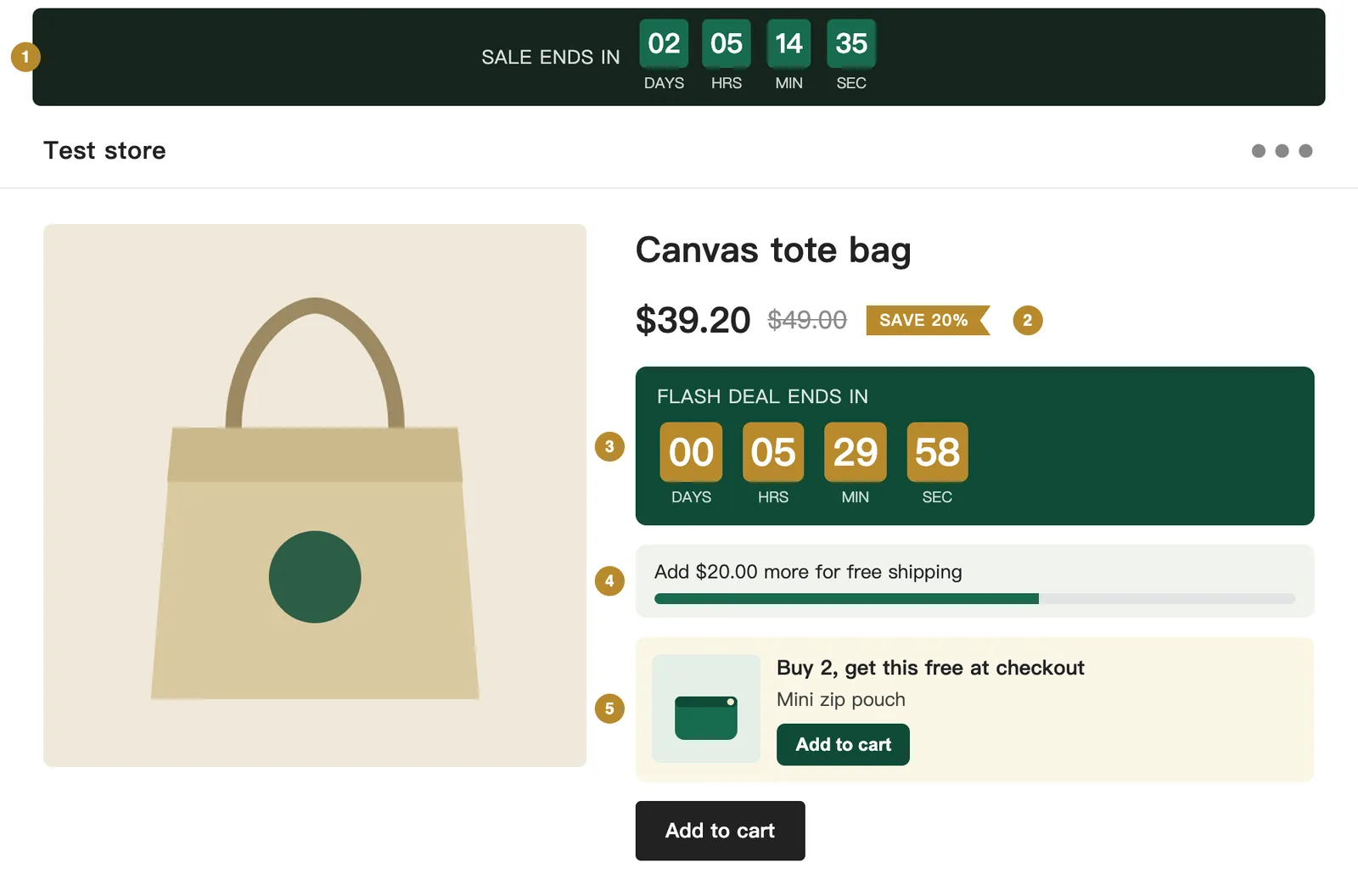
A product page on a test store showing the five SaleGuard blocks: auto countdown, sale badge, countdown, free-shipping bar and buy-X-get-Y card
Test store · real theme blocks
On your storefront

What your shoppers see

Five blocks you can add in the theme editor. Rendered here from the real extension code, with test data.

  1. Auto countdown

    Follows your running or next sale by itself. Hidden when there is no sale.

  2. Sale badge

    Shows the saving as a percentage on any product whose compare-at price is above its price. The struck-through price is drawn by your theme.

  3. Countdown

    You type in a fixed end time. Good for a flash deal.

  4. Free-shipping bar

    Updates as soon as the cart changes.

  5. Buy X, get Y

    Puts the free item in front of the shopper. The discount itself is applied at checkout.

よくある質問

月間の上限を使い切っても価格は復元されますか。

はい。上限はセール作成時のセール価格の書き込み成功回数を数えます。復元とロールバックは上限を消費せず、すべてのプランで利用できます。

「価格変更1回」とは何を指しますか。

1つの商品バリエーションにセール価格を1回書き込んで成功した時点で1回と数えます。そのバリエーションを後で復元しても、月間の回数には加算されません。

SaleGuardはShopifyのテーマを変更したり、表示を遅くしたりしますか。

テーマにコードを入れることはありません。SaleGuardはShopify APIで商品の価格を変更します。任意のテーマブロック(カウントダウン、バッジ、送料バー)は、テーマエディタでご自身が追加した場合にだけ表示されます。

無料トライアルはありますか?返金はできますか?

有料プランに無料トライアルはありません。SaleGuardは無料プランでお試しいただけます。無料プランにもスナップショット、復元、ロールバックが含まれます。お支払い後の返金はありません。解約すると次回以降の請求は発生せず、支払い済みの期間の終わりまでプランをご利用いただけます。

いつでも解約できますか?

はい。アプリ内でFreeに切り替えるか、アンインストールしてください。請求はShopifyを通じて行われ、解約後も支払い済みの期間が終わるまでプランをそのまま使えます。

サポートへの連絡方法は?

support@getsaleguard.com にメールをお送りください。.myshopify.com のストアURLも書いてください。通常、2営業日以内に返信します。

動画チュートリアルを見る
Hana raising a finger, ready to answer a question

今すぐ使える無料ツール。セールでよくあるミスを防ぐ計算ツールとチェッカーです。インストールも登録も不要です。

無料ツールをすべて見る (12)

次のセールに、出口の計画を。

インストールは1分。まず無料プランで始めて、必要になったら有料プランへ。

Shopifyに追加(無料)
Hana waving at the door of a shop decorated for the holidays, a cat by her feet