본문으로 건너뛰기

2026년 블랙프라이데이는 11월 27일입니다.9일 00시간 46분세일 예약하기

SaleGuard
Shopify에 추가 — 무료무료 설치
Scheduled price changes for Shopify

Shopify 대형 세일, 가격이 안 돌아올 걱정 없이 하세요.

세일 가격이 원래대로 돌아오지 않았거나 원가보다 싸게 팔아 본 사장님을 위해 만들었습니다. SaleGuard는 모든 원래 가격을 먼저 저장하고, 원가 아래로 내려가는 가격은 막을 수 있습니다. 끝나면 가격을 되돌리고 하나씩 대조합니다.

  • Free plan: 300 price changes a month, no time limit. Restores never count.
  • Starter $9.99/mo · Pro $19.99/mo
  • Only 2 permissions, no customer data

Using Shopify Rollouts? See what it covers and what it doesn't

30-second promoPress play. Sound is off until you turn it on.

Hana checking her phone over morning coffee
Restore report on our test store: 22 variants checked
Test store · restore report
Sale ended · sample product
$49.00During the sale $39.20
✓ Original price restored
A concrete example

Changed a price mid-sale? It won't be overwritten.

Before each restore, SaleGuard compares the live price and the compare-at price with what the sale set. If they don't match, it leaves that product alone and lists it in the report. It only overwrites if you press Force restore and confirm.

Canvas tote bag

  1. Before the saleThe original $49.00 is saved.
  2. Sale startsPrice becomes $39.20, with $49.00 struck through.
  3. Day 3You mark it down by hand to $34.00.
  4. Sale endsOther products go back to their originals. This one stays at $34.00 and is listed as “Your own price edits were kept”.

Sample numbers. In a sale on our own test store, the report showed 1 of 22 prices kept because they were edited by hand.

Three steps. Then you can walk away.

Choose the products, set the discount and the start and end time in your store's time zone. Every original price is saved before the first change, and put back at the minute you chose.


Hana at a counter, picking products for a sale on a laptop
  1. 상품 고르기. 일러스트

    상품 고르기

    컬렉션, 태그, 공급업체, 재고, 상태로 고릅니다.

  2. 할인과 시간 정하기. 일러스트

    할인과 시간 정하기

    할인율을 고르고, 스토어 시간대로 시작과 종료를 정합니다.

  3. 가격이 알아서 돌아옵니다. 일러스트

    가격이 알아서 돌아옵니다

    원래 가격을 스냅샷에서 다시 쓰고 하나씩 확인합니다.

After the restore, every price is checked one by one.

Test store walkthrough

One real sale, start to finish

자체 데모 스토어에서 20% 세일을 진행했고, 옵션 22개의 결과를 앱 화면에서 그대로 옮겼습니다. 가격은 시작 시각에 내려갔다가 종료 시각에 돌아왔습니다. 1개는 세일 중에 직접 가격을 바꿨는데, SaleGuard가 설정한 그대로 두었습니다.

  1. Originals saved before the first change22 variants
  2. Discount starts on schedule20% · 8:29:00 PM
  3. Prices restored at the end time8:41:00 PM
  4. Every price checked against its original
    • 22확인한 옵션
    • 21원래 가격과 일치
    • 1직접 설정한 가격 유지
Hana relaxing with tea in the evening while her prices switch back on their own
Restore report from our test store
Test store · restore report. Not a customer result.

시간은 America/New_York 기준입니다. 옵션 22개짜리 테스트 스토어의 작은 테스트이며, 벤치마크가 아닙니다.

새 기능 2분 영상 보기


Hana and a shop assistant packing orders in the stockroom
Hana at a desk late at night

모든 요금제 공통, 세 가지 약속

  • 모든 원래 가격을 저장

    첫 변경이 기록되기 전에 SaleGuard가 대상 옵션의 가격과 비교 가격을 저장합니다.

  • 복원은 요금제 한도에 포함 안 됨

    복원됩니다. 한도는 세일을 만들 때 세일가 쓰기가 성공한 횟수를 셉니다. 복원과 롤백은 이 한도를 쓰지 않으며 모든 요금제에서 계속 사용할 수 있습니다.

  • 권한은 2개뿐. 고객 데이터는 보지 않습니다.

    SaleGuard가 Shopify에 요청하는 건 상품과 할인 접근 권한뿐입니다. 고객이나 주문은 읽지 않습니다.

요청하는 권한 자세히 보기

무료로 시작하세요. 더 필요하면 그때 올리면 됩니다.

연간 결제 = 두 달 무료

Free

$0

카드 불필요

먼저 상품 하나로 써 보고 싶을 때.

  • 월 300회 가격 변경
  • 진행 중이거나 예약된 세일 동시 1건
  • 전체 스냅샷, 복원, 롤백, 백업 페이지 및 CSV 내보내기
  • 할인 캠페인 동시 1개, 스토어 카운트다운 타이머(세일 1건)
  • 백업과 비교: 화면에는 차이 처음 25개, CSV에는 전체
무료로 시작

Starter

$9.99/ 월

결제 승인과 처리는 Shopify가 담당합니다.

한 달에 몇 번 세일을 하는 스토어용.

  • 월 10,000회 가격 변경
  • 세일 동시 3건
  • Free 플랜의 모든 기능 포함
  • 매일·매주·매월 반복되는 세일, 그리고 매일 자동 가격 백업
  • 할인 캠페인 동시 10개
  • 스토어 카운트다운 타이머(세일 개수 무제한)
  • 백업과 비교: 화면에는 차이 처음 1,000개, CSV에는 전체
Starter 선택

Pro

$19.99/ 월

결제 승인과 처리는 Shopify가 담당합니다.

매달 세일을 하는 스토어용.

  • 변경 및 세일 무제한
  • BFCM 일정 점검. 자동, 몇 초 만에
  • Starter 플랜의 모든 기능 포함
  • 할인 캠페인 동시 30개
Pro 선택

무료 요금제로 시작하고, 맞으면 유료로 올리세요. 결제 후에는 환불되지 않습니다. 해지하면 다음 결제부터 청구되지 않으며, 이미 결제한 기간이 끝날 때까지 요금제를 그대로 쓸 수 있습니다.

2 public updates so far, the latest on 2026-10-13. See what changed

Hi, I'm an independent developer.

I built SaleGuard because putting prices back by hand after a sale is slow, and it's easy to miss one.

It saves every original price before a sale starts and puts each one back when it ends, so a forgotten sale price doesn't quietly eat into your margin, and you don't have to stay up resetting prices.

Hana, the face of SaleGuard

Hi, I'm Hana. I'll walk you through how a sale starts and how every price comes back.

To introduce the product better, we've invited Hana, an AI-generated spokesperson.
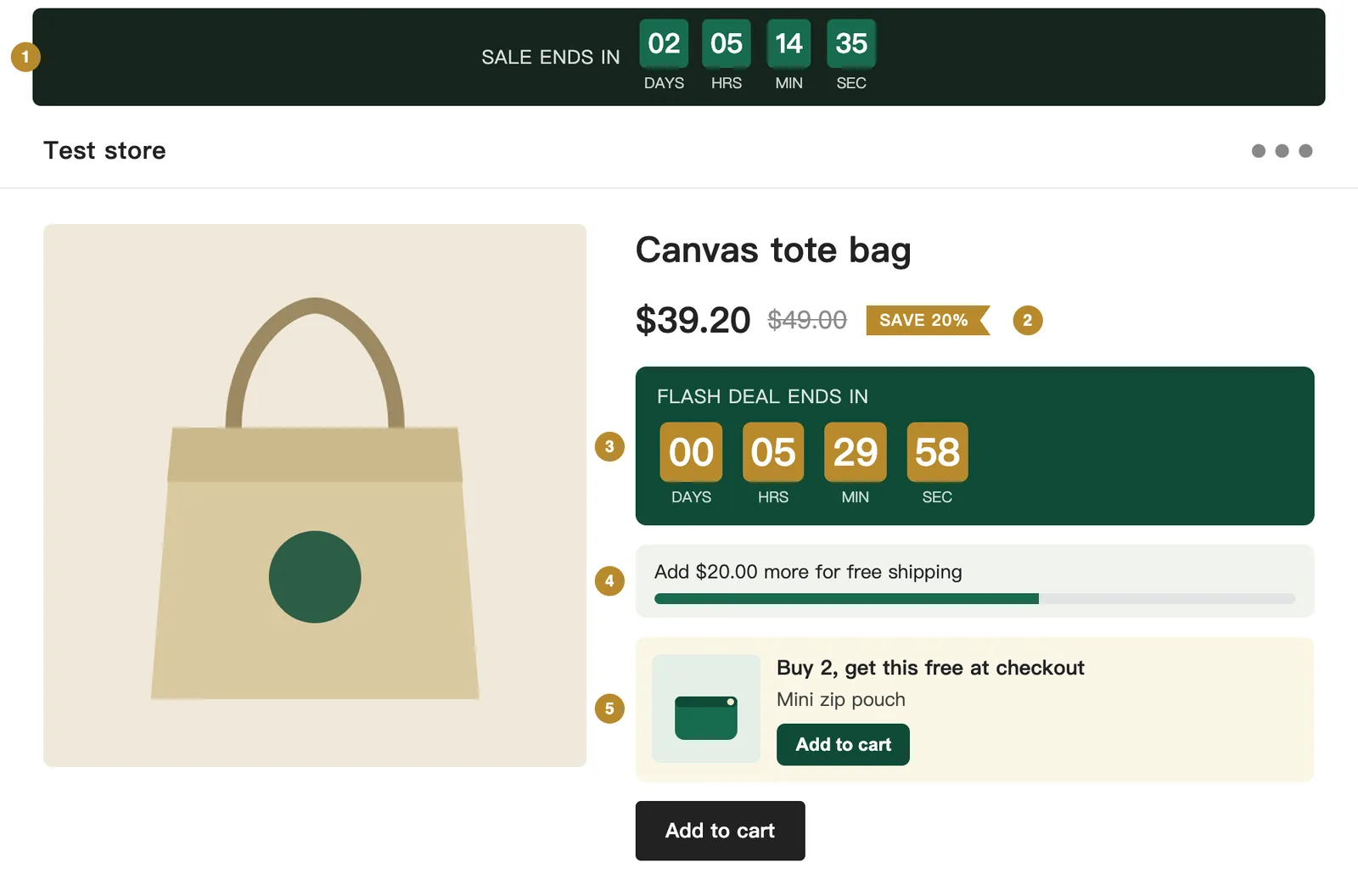
A product page on a test store showing the five SaleGuard blocks: auto countdown, sale badge, countdown, free-shipping bar and buy-X-get-Y card
Test store · real theme blocks
On your storefront

What your shoppers see

Five blocks you can add in the theme editor. Rendered here from the real extension code, with test data.

  1. Auto countdown

    Follows your running or next sale by itself. Hidden when there is no sale.

  2. Sale badge

    Shows the saving as a percentage on any product whose compare-at price is above its price. The struck-through price is drawn by your theme.

  3. Countdown

    You type in a fixed end time. Good for a flash deal.

  4. Free-shipping bar

    Updates as soon as the cart changes.

  5. Buy X, get Y

    Puts the free item in front of the shopper. The discount itself is applied at checkout.

자주 묻는 질문

월 한도를 다 쓰면 가격이 복원되지 않나요?

복원됩니다. 한도는 세일을 만들 때 세일가 쓰기가 성공한 횟수를 셉니다. 복원과 롤백은 이 한도를 쓰지 않으며 모든 요금제에서 계속 사용할 수 있습니다.

가격 변경 1회는 무엇을 뜻하나요?

상품 옵션 하나에 세일가를 성공적으로 한 번 기록하면 1회입니다. 나중에 그 옵션을 복원하는 것은 월간 변경 횟수에 추가되지 않습니다.

SaleGuard가 Shopify 테마를 바꾸거나 느리게 하나요?

테마에 코드를 넣지 않습니다. SaleGuard는 Shopify API로 상품 가격을 변경합니다. 선택 사항인 테마 블록(카운트다운, 배지, 배송비 바)은 테마 편집기에서 직접 추가해야만 나타납니다.

무료 체험이 있나요? 환불도 되나요?

유료 요금제에는 무료 체험이 없습니다. SaleGuard는 무료 요금제로 써 볼 수 있고, 무료 요금제에도 스냅샷, 복원, 롤백이 들어 있습니다. 결제 후에는 환불되지 않습니다. 해지하면 다음 결제부터 청구되지 않으며, 이미 결제한 기간이 끝날 때까지 요금제를 그대로 쓸 수 있습니다.

언제든 해지할 수 있나요?

네. 앱에서 Free로 바꾸거나 앱을 삭제하면 됩니다. 결제는 Shopify를 통해 처리되며, 해지한 뒤에도 이미 결제한 기간이 끝날 때까지 플랜을 계속 쓸 수 있습니다.

문의는 어디로 하나요?

support@getsaleguard.com으로 메일을 보내 주세요. .myshopify.com 스토어 주소도 함께 적어 주시면 됩니다. 보통 영업일 기준 2일 안에 답장드립니다.

영상 튜토리얼 보기
Hana raising a finger, ready to answer a question

지금 바로 쓸 수 있는 무료 도구.세일 때 흔히 생기는 실수를 막아 주는 계산기와 점검 도구입니다. 설치도, 가입도 필요 없습니다.

무료 도구 전체 보기 (12)

다음 프로모션에는 출구 계획을.

설치는 1분이면 됩니다. 무료 요금제로 시작하고, 맞으면 유료로 올리세요.

Shopify에 추가 — 무료
Hana waving at the door of a shop decorated for the holidays, a cat by her feet