30-second promoPress play. Sound is off until you turn it on.
Test store · restore report
Sale ended · sample product
$49.00During the sale $39.20
✓ Original price restored
A concrete example
Changed a price mid-sale? It won't be overwritten.
Before each restore, SaleGuard compares the live price and the compare-at price with what the sale set. If they don't match, it leaves that product alone and lists it in the report. It only overwrites if you press Force restore and confirm.
Canvas tote bag
Before the saleThe original $49.00 is saved.
Sale startsPrice becomes $39.20, with $49.00 struck through.
Day 3You mark it down by hand to $34.00.
Sale endsOther products go back to their originals. This one stays at $34.00 and is listed as “Your own price edits were kept”.
Sample numbers. In a sale on our own test store, the report showed 1 of 22 prices kept because they were edited by hand.
Three steps. Then you can walk away.
Choose the products, set the discount and the start and end time in your store's time zone. Every original price is saved before the first change, and put back at the minute you chose.
I built SaleGuard because putting prices back by hand after a sale is slow, and it's easy to miss one.
It saves every original price before a sale starts and puts each one back when it ends, so a forgotten sale price doesn't quietly eat into your margin, and you don't have to stay up resetting prices.
Hi, I'm Hana. I'll walk you through how a sale starts and how every price comes back.
To introduce the product better, we've invited Hana, an AI-generated spokesperson.
Test store · real theme blocks
On your storefront
What your shoppers see
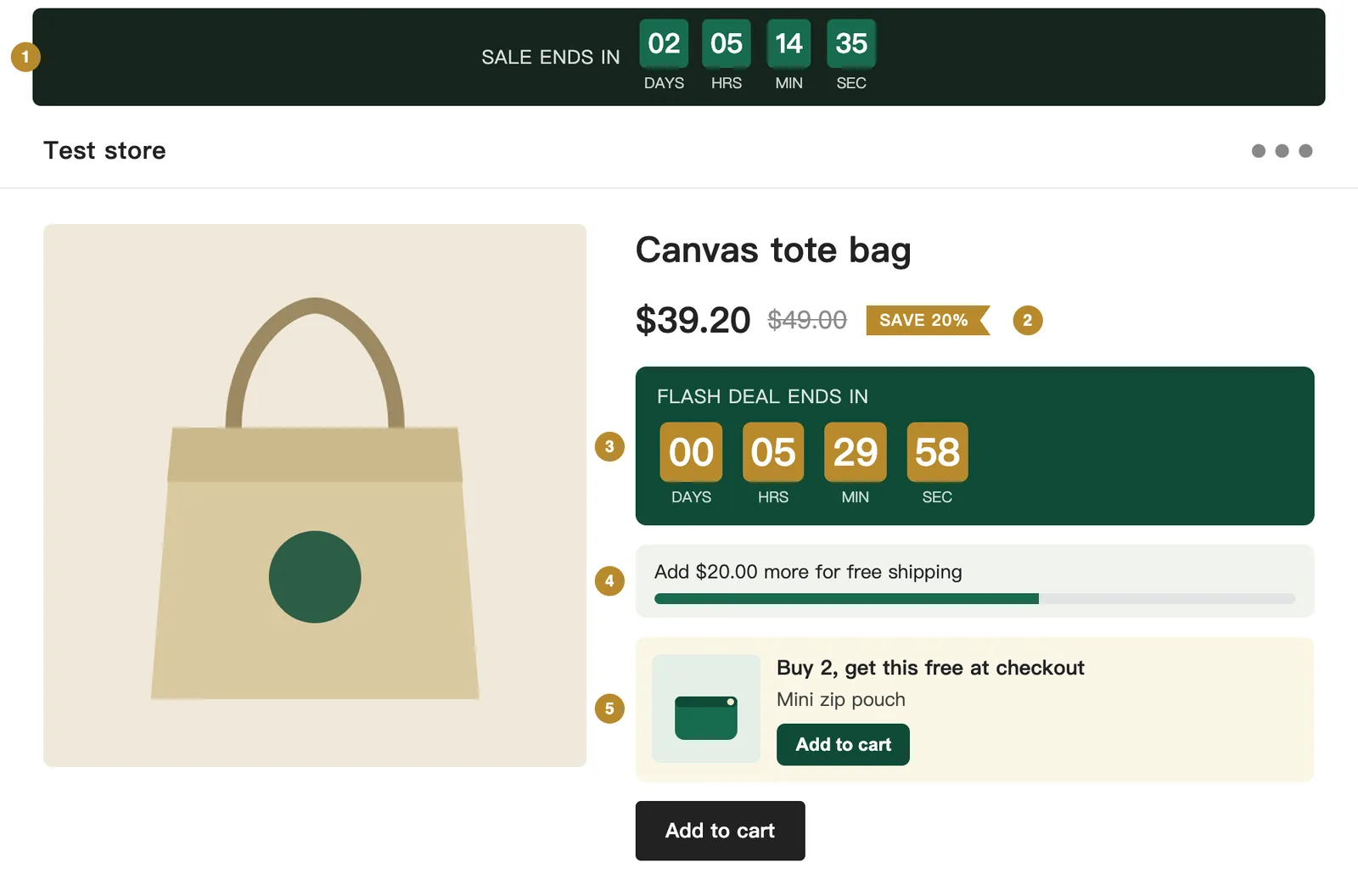
Five blocks you can add in the theme editor. Rendered here from the real extension code, with test data.
1
Auto countdown
Follows your running or next sale by itself. Hidden when there is no sale.
2
Sale badge
Shows the saving as a percentage on any product whose compare-at price is above its price. The struck-through price is drawn by your theme.
3
Countdown
You type in a fixed end time. Good for a flash deal.
4
Free-shipping bar
Updates as soon as the cart changes.
5
Buy X, get Y
Puts the free item in front of the shopper. The discount itself is applied at checkout.